
one year with MEPIS
Things are going well for Proton Communications. The LMS is maturing nicely (and I'm working on a beautiful Web 2.0 file manager that I may be able to open source), our content is getting more polished, and we're making the important sales. My boss told me the other day that we may be able to buy me a company computer. It's tempting--I've spent a little time on dell.com, and it looks like I could get a desktop with a 3 GHz processor, 2 GB 667 MHz RAM, an 80 GB hard drive, and a 20" monitor for $1,400 and upgrade to two RAID 1 160 GB hard drives for $200 or to an nVidia 3450 and a second monitor for $1,000. The full $2,600 package would be beautiful.
My boss sounded hesitant, though, when I suggested dual-booting it, and I realized that I'm now at the point where I'd rather have a slow computer without Windows than a dream computer without Linux. In virtually every area, I now prefer using MEPIS to using Windows.
OS installation: MEPIS
Download a CD image. Boot from the CD into MEPIS. Click the install icon on the desktop. Wait a couple of hours. Reboot. It's a beautiful thing.Application installation: MEPIS
I hear a lot about how Linux doesn't have a good way to install programs. This is, to my mind, ridiculous. If I hear about an interesting program, I start Synaptic and search for its name. I click on the Install checkbox. I click "Apply." It fetches it for me and installs it. No reboot necessary. I start the program. I configure it. If I don't like it, I go back to Synaptic, change the checkbox to Uninstall, and click "Apply." This is much better than Windows.Eye candy: MEPIS
Here are screenshots for comparison. All of the basic elements are the same.
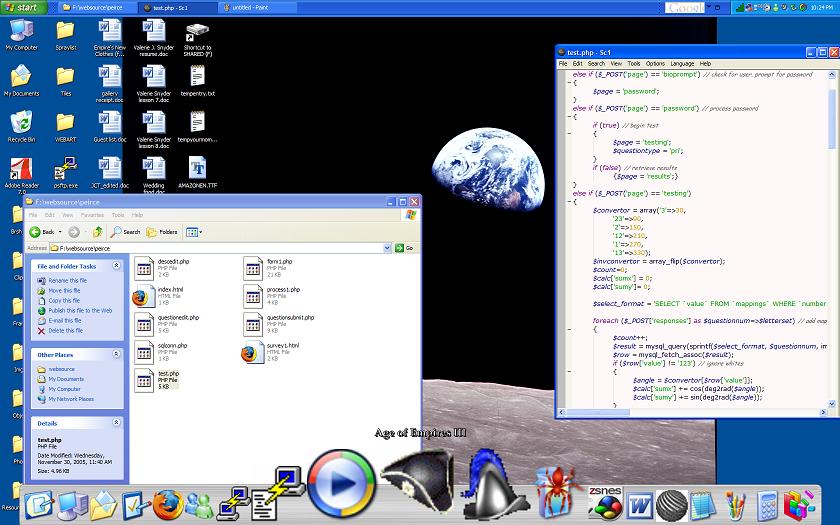
KDE rocks Window's environment, no contest. With the Polyester theme and Nuvola icons, I think it's far more visually pleasing, and even if they weren't, I'd still pick KDE to be able to use Palatino for all of my system fonts. Window's RocketDock is much better than KDE's kooldock, though.
Speed: Windows
MEPIS seems consistently twice as slow as Windows, whether booting, starting applications, or shutting down. I'd like to see how it runs on a really old computer sometime.Networking: Windows
MEPIS is intolerably bad at WPA. I had to manually set up an etc/init.d script to run wpa_supplicant at boot, and I still have to try to connect several times when it boots up. WEP isn't bad, but I wouldn't try setting up MEPIS without an Ethernet cable.Hardware detection: Windows
Getting my nVidia card working in MEPIS was a pain. After installing a few packages, I had to usesudo dpkg-reconfigure xserver-xorg to finally get things working. It's nice that there is a configuration wizard at all, but it's an ugly console-based thing with no "Preview" option. X.org is ridiculously fragile. On the plus side, I can now scroll with the right edge of my mousepad, and it never flickers the monitor, like Windows does for a few seconds when it starts up.Edit: I just found the
displayconfig tool in the kde-guidance package. It may have made this stuff slightly easier.Edit: No. It kicked me back down to 800x600, and I had to run
dpkg-reconfigure xserver-xorg.Web browser: MEPIS
I'm giving the Firefox win over IE to MEPIS, even though it's not really relevant. Microsoft deserves to die for the utter worthlessness of the IE Javascript error console.IM client: MEPIS
Likewise, Gaim wins for open source over the various proprietary clients, even though you can run it in Windows.Office suite: MEPIS
I really like Open Office. As with Firefox and IE, all of the incompatibility issues I've noticed have been ridiculous behaviour in Microsoft Office. It's nice-looking and easy to use.Casual gaming: MEPIS
I haven't seen a good pinball game, but aside from that, KDE is brimming with fun little games--Tetris, Worms, Asteroids, Breakout, Galaxian, every solitaire game you can imagine (including Spider), that one with bouncing balls where you try to make walls, the Tron light wall motorcycle racing game. Lots of fun. And now that I have nVidia set up properly, ZSNES runs like a dream.Hardcore gaming: Windows
No surprise win here. I'm about as likely to buy another Windows box for Age of Empires as I am to buy an XBox 360 for Halo 3.Editor: MEPIS
I cannot think how I would improve Kate. It has every feature I could ask for and several I hadn't dreamed of. (Built-in file search, for example.) Scite is a good editor for Windows, though.Media player: MEPIS
Amarok is, again, perfect in its class as a music player. It's so stylish, too--I feel like I should be using it to play cooler music. For video, KPlayer hasn't failed me yet.Paint: MEPIS
Kolourpaint is great. It's a perfect example of how Linux beats Microsoft--little improvements that make a good product shine. The differences could hardly justify Microsoft starting a Paint 2.0 project, but they make it so much more pleasant to use.Advanced drawing: MEPIS
I don't like the GIMP. I think it's needlessly unintuitive. I'd sooner invest the time to learn to use it than invest the money to buy Illustrator, though.Gmail integration: Windows
The KCheckGmail people seem nice, honestly. It just isn't a very good program. It doesn't show message subjects, and it's frequently inaccurate.Edit: Gmail-notify is good.
System monitor: MEPIS
Speaking of which, my temperature's at 83 celsius. I'd better call it a night.

0 comments:
Post a Comment